Plasmo CSUI 生命周期
Plasmo 的 CSUI 负责在内容脚本中挂载和卸载你的 React、Vue 或 Svelte 组件。尽管每个 UI 库/框架的挂载 API 略有不同,但顶层生命周期大致相同:
- 获取一个
Anchor - 创建或定位一个
Root Container - 将组件 渲染 到
Root Container
术语
| 术语 | 描述 |
|---|---|
| Anchor | 告诉 CSUI 如何以及在哪里挂载你的组件 |
| Anchor-getter | 告诉 CSUI 如何找到你的锚点 |
| Overlay | 在顶级(最大 z-index)覆盖元素上挂载你的组件 |
| Inline | 将你的组件嵌入到网页的 DOM 中,靠近目标元素 |
| Root Container | CSUI 创建的 ShadowDOM 元素,用于隔离你的组件 |
| Renderer | 顶层生命周期运行器(它负责所有操作) |
Anchor
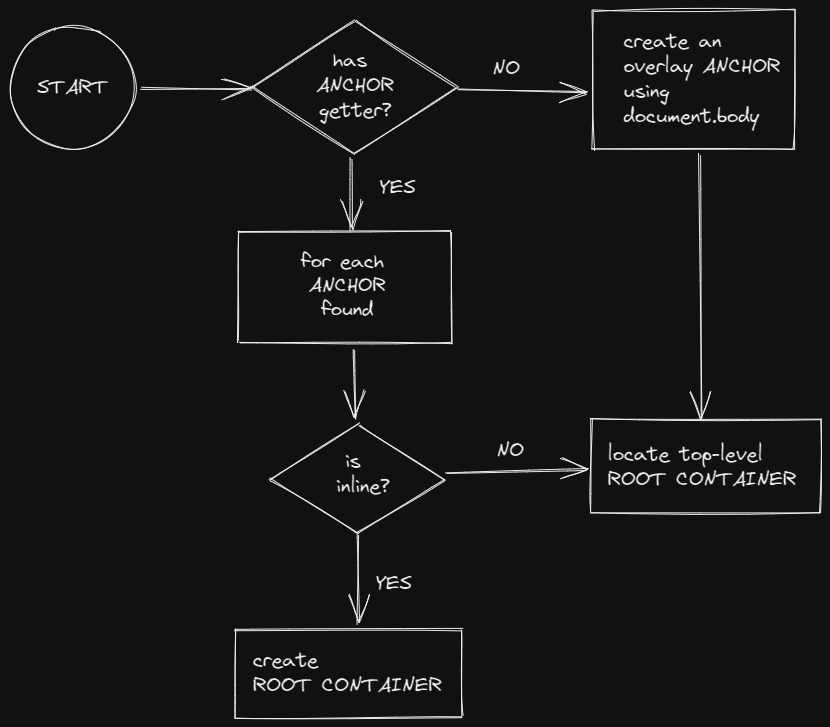
Plasmo CSUI 锚点由以下类型定义:
export type PlasmoCSUIAnchor = {
  type: "overlay" | "inline"
  element: Element
}
默认情况下,CSUI 生命周期使用 document.body 元素创建一个覆盖锚点:
{
  type: "overlay",
  element: document.body
}
如果定义并导出了任何锚点获取函数,CSUI 生命周期将使用返回的元素和相关的锚点类型。由于锚点获取函数可以是异步的,你还可以控制 Plasmo 挂载组件的时间。例如,你可以等待特定元素出现在页面上后再挂载你的组件。
锚点通过锚点属性传递给 CSUI。你可以这样访问它:
import type { PlasmoCSUIProps } from "plasmo"

const AnchorTypePrinter: FC<PlasmoCSUIProps> = ({ anchor }) => {
  return <span>{anchor.type}</span>
}

export default AnchorTypePrinter
Overlay
Overlay 锚点生成 CSUI Overlay Containers,它们批量挂载到每个 CSUI 的单个 Root Container 元素上。Overlay Containers 相对于每个锚点元素绝对定位,并具有最大的 z-index。然后,你的导出的 CSUI Component 将挂载到每个 Overlay Container 上:
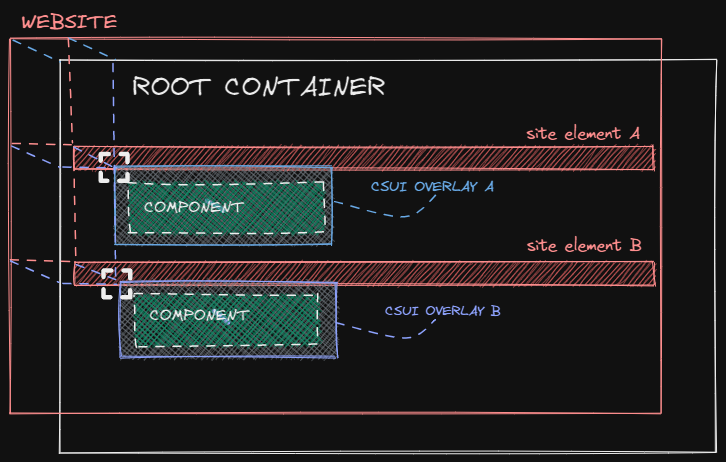
要指定单个 overlay 锚点,导出一个 getOverlayAnchor 函数:
import type { PlasmoGetOverlayAnchor } from "plasmo"

export const getOverlayAnchor: PlasmoGetOverlayAnchor = async () =>
  document.querySelector("#pricing")
要指定多个 overlay 锚点,导出一个 getOverlayAnchorList 函数:
import type { PlasmoGetOverlayAnchorList } from "plasmo"

export const getOverlayAnchorList: PlasmoGetOverlayAnchorList = async () =>
document.querySelectorAll("a")getOverlayAnchorList 当前不支持动态情况。例如,
如果在初始渲染后向网页添加新的锚点,CSUI
生命周期将无法检测到它们。欢迎提交 PR 来改进此功能!
更新位置
默认的 Overlay Container 监听窗口滚动事件以对齐锚点元素。你可以通过导出一个 watchOverlayAnchor 函数来自定义 Overlay Container 刷新其绝对位置的方式。下面的例子每 8472ms 刷新一次位置:
import type { PlasmoWatchOverlayAnchor } from "plasmo"

export const watchOverlayAnchor: PlasmoWatchOverlayAnchor = (
  updatePosition
) => {
  const interval = setInterval(() => {
    updatePosition()
  }, 8472)

  // 在卸载时清除间隔
  return () => {
    clearInterval(interval)
  }
}
请查看 with-content-scripts-ui/contents/plasmo-overlay-watch.tsx (opens in a new tab) 示例。
Inline
Inline 锚点将你的 CSUI Component 直接嵌入到网页中。每个锚点生成一个 Root Container,追加到其目标元素旁边。在每个 Root Container 内,创建一个 Inline Container,然后用于挂载导出的 CSUI Component:
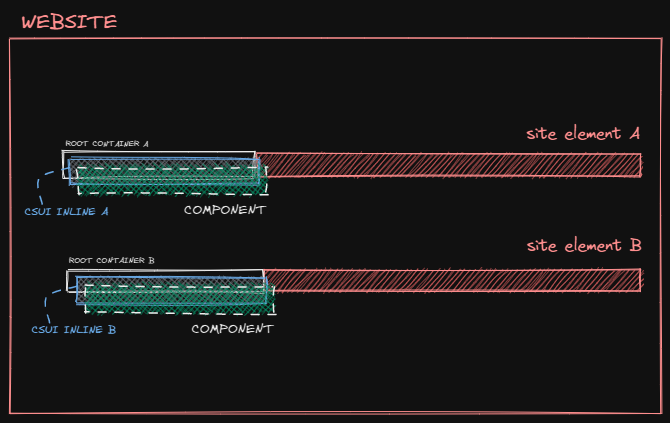
要指定单个 inline 锚点,导出一个 getInlineAnchor 函数:
import type { PlasmoGetInlineAnchor } from "plasmo"

export const getInlineAnchor: PlasmoGetInlineAnchor = async () =>
  document.querySelector("#pricing")
要指定带有插入位置的单个 inline 锚点:
import type { PlasmoGetInlineAnchor } from "plasmo"

export const getInlineAnchor: PlasmoGetInlineAnchor = async () => ({
      element: document.querySelector("#pricing"),
      insertPosition: "afterend"
})
要指定多个 inline 锚点,导出一个 getInlineAnchorList 函数:
import type { PlasmoGetInlineAnchorList } from "plasmo"

export const getInlineAnchorList: PlasmoGetInlineAnchorList = async () =>
  document.querySelectorAll("a")
要指定带有插入位置的多个 inline 锚点:
import type { PlasmoGetInlineAnchorList } from "plasmo"

export const getInlineAnchorList: PlasmoGetInlineAnchorList = async () => {
  const anchors = document.querySelectorAll("a")
  return Array.from(anchors).map((element) => ({
    element,
    insertPosition: "afterend"
  }))
}
请查看 with-content-scripts-ui/contents/plasmo-inline.tsx (opens in a new tab) 示例。
Root Container
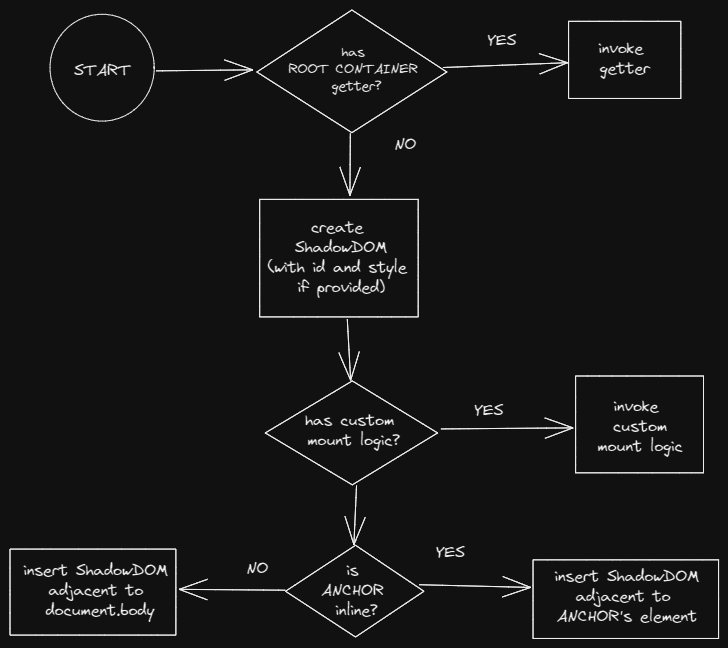
Root Container 是挂载你的 CSUI Component 的地方。内置的 Root Container 是一个带有 plasmo-csui 自定义标签的 ShadowDOM 元素。这允许你为 Root Container 和它们导出的组件安全地设置样式,而不受网页样式的影响。
自定义 DOM 挂载
Root Container 创建一个 shadowHost,它被注入到网页的 DOM 树中。默认情况下,Plasmo 在 inline 锚点之后注入 shadowHost,并在 document.body 之前注入 overlay 锚点。要自定义此行为,导出一个 mountShadowHost 函数:
import type { PlasmoMountShadowHost } from "plasmo"

export const mountShadowHost: PlasmoMountShadowHost = ({
  shadowHost,
  anchor,
  mountState
}) => {
  anchor.element.appendChild(shadowHost)
  mountState.observer.disconnect() // 可选演示:根据需要停止观察者
}
Closed Shadow Root
默认情况下,shadow root 是“开放”的,允许任何人(开发者和扩展用户)检查 ShadowDOM 的层次结构。要覆盖此行为,导出一个 createShadowRoot 函数:
import type { PlasmoCreateShadowRoot } from "plasmo"

export const createShadowRoot: PlasmoCreateShadowRoot = (shadowHost) =>
  shadowHost.attachShadow({ mode: "closed" })
自定义样式
内置的 ShadowDOM 提供了一种方便的机制,允许扩展开发者通过导出一个 getStyle 函数来返回一个 HTML style 元素 (opens in a new tab) 来安全地设置组件样式。
有关设置 CSUI 样式的进一步指导,请阅读 Styling Plasmo CSUI。
自定义 Root Container
有时,你可能需要完全替换 Plasmo 的 Shadow DOM 容器实现以满足需求。例如,你可能希望利用网页中的某个元素,而不是创建一个新的 DOM 元素。为此,导出一个 getRootContainer 函数:
import type { PlasmoGetRootContainer } from "plasmo"

export const getRootContainer = () => document.getElementById("itero")
你可能需要这样做的原因包括:
- 扩展需要吸收主机网页的样式 (opens in a new tab)
- 扩展需要直接将组件挂载到网页中,而不是使用 shadow DOM
- 扩展需要使用 iframe (opens in a new tab),而不是
如果你导出了一个 getRootContainer 函数,任何扩展内置 ShadowDOM 的函数,如 getStyle 或 getShadowHostId 都将被忽略。
根据需要在自定义 getRootContainer 逻辑中调用这些函数!
请查看 with-content-scripts-ui (opens in a new tab) 示例。
Renderer
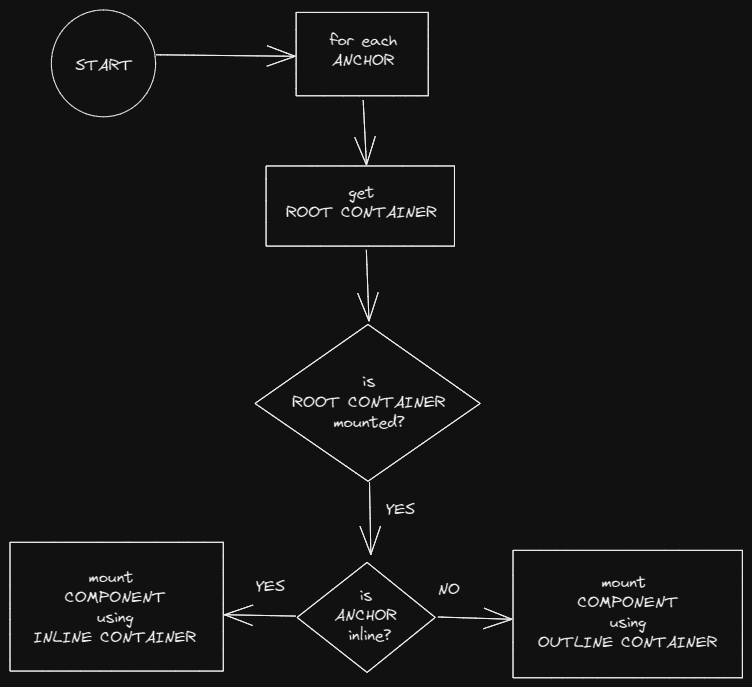
Renderer 负责观察网站的 DOM 以检测每个 Root Container 的存在,并跟踪每个锚点元素与其 Root Container 之间的链接。一旦确定了稳定的 Root Container,Renderer 将导出的 CSUI Component 挂载到 Root Container 上,具体使用 Inline Container 或 Overlay Container 取决于 Anchor 的类型。
检测和优化 Root Container 移除
当网页更改其 DOM 结构时,Root Container 可能会被移除。例如,给定一个充满收件箱项的电子邮件客户端,以及每个项旁边注入的 CSUI。当一项被删除时,根容器也会被移除。
为了检测 Root Container 移除,CSUI Renderer 将每个已挂载容器的根与 window.document 对象进行比较。此检查可以通过导出一个 getShadowHostId 函数优化到 O(1):
import type { PlasmoGetShadowHostId } from "plasmo"

export const getShadowHostId: PlasmoGetShadowHostId = () => `adonais`
该函数还允许开发人员为每个找到的锚点自定义 id:
import type { PlasmoGetShadowHostId } from "plasmo"

export const getShadowHostId: PlasmoGetShadowHostId = ({ element }) =>
  element.getAttribute("data-custom-id") + `-pollax-iv`
自定义 Renderer
开发人员可以导出一个 render 函数来覆盖默认渲染器。你可能需要这种能力来:
- 提供自定义的
Inline container或Overlay container - 自定义挂载逻辑
- 提供自定义的
MutationObserver
例如,使用现有元素作为自定义容器:
import type { PlasmoRender } from "plasmo"

import { CustomContainer } from "~components/custom-container"

const EngageOverlay = () => <span>ENGAGE</span>

// 这个函数覆盖了默认的 `createRootContainer`
export const getRootContainer = () =>
  new Promise((resolve) => {
    const checkInterval = setInterval(() => {
      const rootContainer = document.getElementById("itero")
      if (rootContainer) {
        clearInterval(checkInterval)
        resolve(rootContainer)
      }
    }, 137)
  })

export const render: PlasmoRender = async ({
  anchor, // 被观察的锚点,或者 document.body。
  createRootContainer // 这个函数创建默认的根容器
}) => {
  const rootContainer = await createRootContainer()

  const root = createRoot(rootContainer) // 任意根
  root.render(
    <CustomContainer>
      <EngageOverlay />
    </CustomContainer>
  )
}
如何动态创建自定义容器:
import type { PlasmoRender } from "plasmo"

import { CustomContainer } from "~components/custom-container"

const EngageOverlay = () => <span>ENGAGE</span>

// 这个函数覆盖了默认的 `createRootContainer`
export const getRootContainer = ({ anchor, mountState }) =>
  new Promise((resolve) => {
    const checkInterval = setInterval(() => {
      let { element, insertPosition } = anchor
      if (element) {
        const rootContainer = document.createElement("div")
        mountState.hostSet.add(rootContainer)
        mountState.hostMap.set(rootContainer, anchor)
        element.insertAdjacentElement(insertPosition, rootContainer)
        clearInterval(checkInterval)
        resolve(rootContainer)
      }
    }, 137)
  })

export const render: PlasmoRender = async ({
  anchor, // 被观察的锚点,或者 document.body。
  createRootContainer // 这个函数创建默认的根容器
}) => {
  const rootContainer = await createRootContainer(anchor)

  const root = createRoot(rootContainer) // 任意根
  root.render(
    <CustomContainer>
      <EngageOverlay />
    </CustomContainer>
  )
}
使用内置的 Inline Container 或 Overlay Container:
import type { PlasmoRender } from "plasmo"

const AnchorOverlay = ({ anchor }) => <span>{anchor.innerText}</span>

export const render: PlasmoRender = async (
  {
    anchor, // 被观察的锚点,或者 document.body。
    createRootContainer // 这个函数创建默认的根容器
  },
  _,
  OverlayCSUIContainer
) => {
  const rootContainer = await createRootContainer()

  const root = createRoot(rootContainer) // 任意根
  root.render(
    // 你必须传递一个锚点以挂载默认容器。这里我们传递默认的一个
    <OverlayCSUIContainer anchor={anchor}>
      <AnchorOverlay anchor={anchor} />
    </OverlayCSUIContainer>
  )
}
如果你需要自定义 MutationObserver,不要导出锚点获取函数。否则,内置的 MutationObserver 仍然会被触发。